
1.4 Viewing Controller Data
Completion requirements
1.4 Viewing Controller Data
In this lesson: you will be able to open a controller and correctly read its inputs and outputs.
Points grouped by type
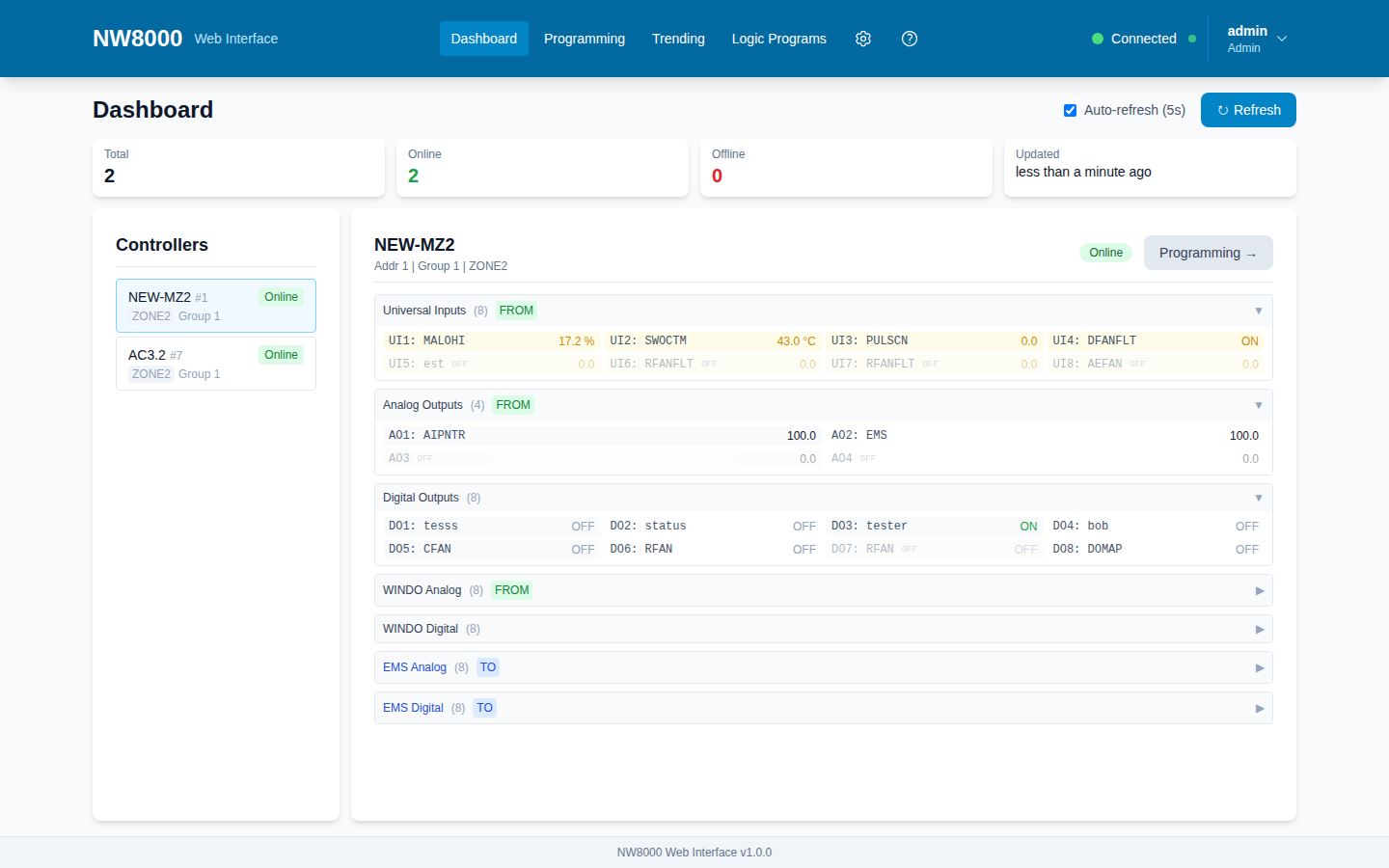
Open a controller from the Dashboard and you will see all of its live points, grouped by type.
- Universal Inputs (UIs) are the sensor readings coming in from the hardware — temperatures, pressures, humidity, status contacts. Each shows its name, its live value, and its engineering units, like degrees Celsius or percent.
- Analog Outputs (AOs) are the modulating outputs the controller drives — a valve or damper position, a fan speed — usually shown as a percentage.
- Digital Outputs (DOs) are the on/off outputs — a fan running, a pump enabled — shown simply as On or Off.
- WINDO values are the Analog and Digital Values the controller shares with the rest of the system. Think of them as the controller's published results, like a calculated setpoint or an occupancy status.
- EMS values are Analog and Digital values passed to this controller from a manager, or a zone above it. These are the one group that is not just for viewing: as an operator you can adjust an EMS value by typing a new one, which changes what is sent to the controller.
Where the names come from
The point names come from the controller's own programming, so they should match what your commissioning engineer set up. If a point shows a generic name or looks disabled, it simply is not in use.
So a simple rule of thumb: the inputs and outputs — UIs, AOs, DOs — and the WINDO values are live and read-only; you are observing. The EMS values are the exception you can change. Doing that safely — adjusting setpoints — is covered in the setpoints lesson.
Key points
- Universal Inputs (UIs) are sensor readings coming into the controller, with a value and engineering units.
- Analog Outputs (AOs) are modulating outputs (valve/damper/fan), usually a percentage.
- Digital Outputs (DOs) are on/off outputs shown as On or Off.
- WINDO Analog/Digital Values are the controller's published results shared with the rest of the system.
- Point names come from the controller's programming. UIs, AOs, DOs and WINDO are read-only; EMS values are the one group an operator can adjust.
Check your understanding
- Which group shows sensor readings coming into the controller?
- A Digital Output shows “On.” What does that mean?
- Where do the point names come from?
Last modified: Friday, 4 September 2026, 7:59 AM